
By Paul Ovigele

Quantity fields in SAP costing-based Profitability Analysis (CO-PA) give sales and contribution margin reports the context needed to interpret revenue and costs. Sales quantities, production quantities, and measures such as net weight must be mapped to the appropriate quantity value fields.
This guide covers three sources: sales documents using KE4M, manufacturing order settlement using a PA transfer structure, and direct FI postings. Quantity value fields are defined with the relevant quantity attribute, as illustrated by the original KEA6 configuration examples.
SAP S/4HANA scope: These value-field mappings apply to costing-based CO-PA. SAP documents that Margin Analysis does not use value fields. The screenshots below are historical SAP GUI examples from Paul Ovigele’s original article; availability and settings depend on the release and process. For a related S/4HANA topic, see Margin Analysis extensibility and custom characteristics.
1. Assigning Quantity Fields from Sales Documents
For sales-related quantity reporting, map the relevant quantity from billing documents or incoming sales orders (if you have activated Transfer of Incoming Sales Orders using transaction KEKF) by going to transaction KE4M or by accessing the following configuration menu path:
Controlling - Profitability Analysis - Flows of Actual Values - Transfer of Incoming Sales Orders - Assign Quantity Fields or Controlling - Profitability Analysis - Flows of Actual Values - Transfer of Billing Documents - Assign Quantity Fields
In the next screen, click on New Entries and enter the sales quantity fields and the corresponding value fields that you want to map them to, as shown in Figure 1.
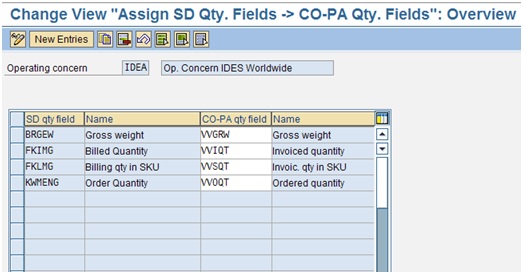
Figure 1 Assign SD Qty Fields to CO-PA Qty Fields
With the relevant transfer active and assignments maintained, the supported sales document flow updates the assigned quantity fields in costing-based CO-PA.
2. Assigning Quantity Fields from Manufacturing Orders
For production orders and process orders, or product cost collectors, you can transfer the quantity produced to CO-PA by going to transaction KEI1 or via the configuration menu path:
Controlling - Profitability Analysis - Flows of Actual Values - Settlement of Production Variances - Define PA Transfer Structure for Variance Settlement
Click on the relevant PA Transfer Structure specified in the relevant settlement profile and double-click on the Assignment Lines folder. Then enter an assignment number, a description and click on the Qty billed/delivered checkbox as shown in Figure 2.

Figure 2 Define PA Transfer Structure
Then, double-click on the Value Fields folder and select Quantity Field; in the illustrated example, enter 3 in the Fixed/Variable column and enter the relevant quantity value field as shown in Figure 3.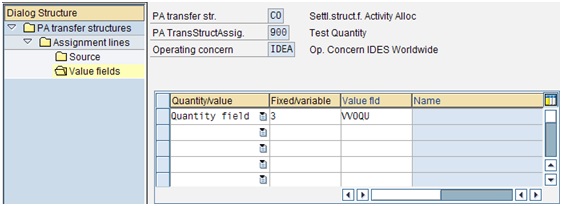
Figure 3 Quantity Fields
In the illustrated settlement scenario, the configured quantity is transferred to costing-based CO-PA when the eligible manufacturing order is settled. Confirm the order status, settlement profile, and quantity-field assignment for your process.
For the surrounding variance and settlement processes, see our SAP Product Cost Controlling guide.
3. Assigning Quantity Fields from FI Documents
There are times when you need to post manual FI documents to CO-PA (for example, using transaction FB50 or FB70) and you want the quantities that you enter in this transaction to flow to CO-PA (note, you would need to enter the relevant quantity and unit of measure in the Qty and Base Unit of Meas. Columns of these transactions). You can do this by going to transaction KEI1 or via the configuration menu path:
Controlling - Profitability Analysis - Flows of Actual Values - Direct Posting from FI/MM - Maintain PA Transfer Structure for FI Postings
Highlight the PA transfer structure used for the relevant direct FI postings and double-click on the Assignment Lines folder. You have already assigned the appropriate cost elements to the Amount value fields. Therefore, simply select the assignment line that contains the cost elements and double-click on the Value Fields folder. Then select Quantity Field and enter the relevant quantity value field. Figure 4 illustrates a configuration with 3 in the Fixed/Variable column; check the field help and the requirements of your specific posting source before adopting the example.
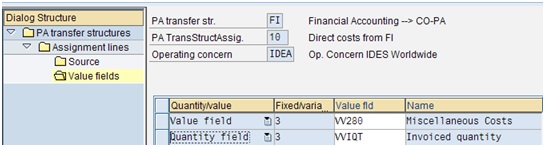
Figure 4 Define PA Transfer Structure
For a supported direct FI posting, the assigned quantity can update costing-based CO-PA when the account assignment, PA transfer structure, quantity, and unit of measure are all maintained correctly.
Check the Quantity Update
- Confirm that the target quantity value field belongs to the active operating concern.
- Check the source quantity and unit of measure, including any required conversion.
- Verify the relevant sales assignment or PA transfer structure and the posting or settlement prerequisites.
- Post a representative test document and compare the source quantity with the resulting CO-PA line item. Do not combine quantities with incompatible units in a report total.
Missing Quantities in Your CO-PA Reports?
Get help tracing sales, manufacturing, and FI quantities into your profitability reporting.
ERPCorp helps teams review CO-PA mappings, PA transfer structures, settlement settings, and units of measure to improve reporting accuracy. We also help assess the differences between costing-based CO-PA and SAP S/4HANA Margin Analysis.
Glossary
Profitability Analysis (CO-PA)
Analysis of revenues, costs, and contribution margins by market characteristics such as customer, product, or sales organization.
Costing-Based CO-PA
The form of profitability analysis that uses configured value fields for amounts and quantities.
Quantity Value Field
A value field configured to hold a quantity rather than a currency amount, together with the applicable unit of measure.
Operating Concern
The organizational and reporting structure defining the characteristics and, for costing-based CO-PA, value fields used in profitability analysis.
PA Transfer Structure
A configuration structure mapping relevant source values and quantities to costing-based CO-PA value fields. The applicable structure depends on the posting or settlement process.
Settlement Profile
Configuration controlling settlement options and permitted receivers, including the relevant PA transfer structure where applicable.
Unit of Measure
The unit expressing a quantity, such as pieces, kilograms, or liters. Correct units and conversion rules are essential for meaningful quantity reporting.
Order Type
A classification controlling order-related settings, including settlement-profile defaults.
Margin Analysis
The account-based profitability analysis approach in SAP S/4HANA. It uses accounts and profitability characteristics rather than costing-based CO-PA value fields.