
By Anand Seetharaju, CPA, CMA
SAP Margin Analysis extensibility lets you add characteristics for reporting requirements that standard fields do not cover. Two approaches are especially relevant in SAP S/4HANA: classic CO-PA characteristics created with transaction KEA5 and custom fields created with the Accounting: Market Segment business context.
The choice affects how you derive values, expose fields in SAP Fiori and CDS-based analytics, and maintain your solution. This article compares the approaches and explains the reporting checks to complete before you use a new characteristic.
For example, a company may want to analyze profitability by a customer classification specific to its business. Before adding a field, confirm whether an existing standard characteristic can meet that requirement.
Table of Contents
- Quick Takeaway
- Classic CO-PA Characteristics With KEA5
- Custom Fields for Market Segments
- KEA5 and Custom Fields Compared
- Enable Custom Characteristics in Reporting
- Implementation Recommendations
- SAP References
- About Anand Seetharaju
- Glossary
Quick Takeaway
For a new requirement, start by evaluating the Custom Fields app and Accounting: Market Segment business context. It supports enabling field usage in relevant CDS views and applications. KEA5 remains relevant for existing characteristics and specialized requirements.
Creating a field does not make it available in every report. Confirm the usages supported by your SAP release, enable the required reporting usages, publish the field, and test the intended apps.
Classic CO-PA Characteristics With KEA5
Transaction KEA5 is the classic method for maintaining CO-PA characteristics in SAP S/4HANA on-premise and Private Edition. Define the characteristic and include it in the relevant operating concern. Its values can then support profitability analysis according to your configuration.
The characteristic maintenance screen is shown in Figure 1.
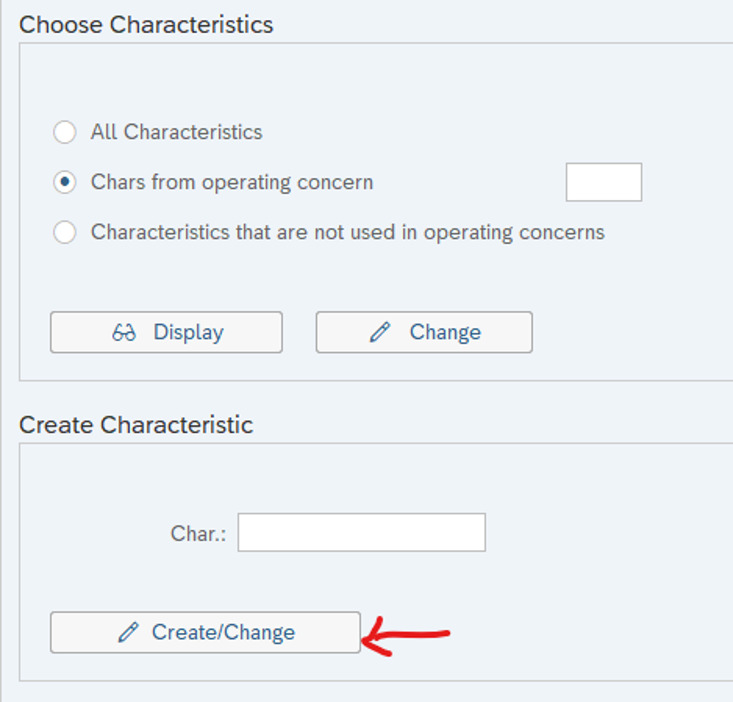
Figure 1: Classic CO-PA characteristic maintenance using KEA5.
Plan reporting separately. SAP explains that KEA5 characteristics require manual additions to the corresponding CDS views before they can be used in CDS-based reporting. A characteristic visible in a posting transaction may therefore still be missing from an analytical app.
In an existing system, review the characteristic’s derivation rules, historical values, and reporting dependencies before deciding whether a different extensibility approach is appropriate.
Custom Fields for Market Segments
The Custom Fields app provides key user extensibility using the Accounting: Market Segment business context. SAP introduced this integration for CO-PA in SAP S/4HANA 2020. Assign the field to the relevant operating concern and enable its supported usages.
Figure 2 illustrates the Market Segment context in the Custom Fields app.
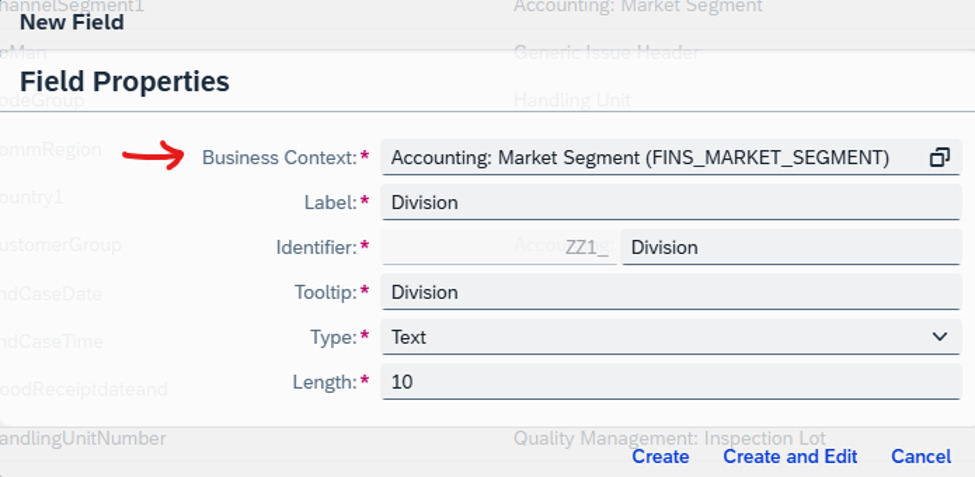
Figure 2: Create a custom characteristic using the Market Segment business context.
Choose the field type and value help to suit the business requirement. Then enable the relevant analytics, UI, or interface usages offered for that field and publish it. Availability depends on the application and release; it is not a guarantee that every SAP Fiori app or API will expose the field.
For on-premise and Private Edition scenarios requiring an existing data element, review the developer-assisted approach using INCL_EEW_MARKET_SEGMENT_PS and SCFD_EUI in SAP Note 3005736. Treat this as a separate implementation choice and check its prerequisites.
KEA5 and Custom Fields Compared
The main differences between the approaches are summarized in Table 1:
| Comparison | KEA5 Characteristics | Custom Fields App |
|---|---|---|
| Availability | SAP S/4HANA on-premise and Private Edition; not the Public Edition extensibility route. | Available in Public Edition and supported on-premise/Private Edition releases. SAP introduced this CO-PA integration in SAP S/4HANA 2020. |
| Creation method | Maintain Characteristics (KEA5), followed by operating concern configuration. | Custom Fields app with the Accounting: Market Segment business context and operating concern assignment. |
| CDS reporting | Requires manual extension of the relevant CDS views. | Enable the supported usages and publish the field; verify the intended analytical query. |
| Derivation | KEDR in on-premise and Private Edition systems. | Use the derivation or substitution options supported by your edition, release, and business context. |
| Field design | Check the supported characteristic type, length, and operating concern capacity. | Check the field types, code-list restrictions, and available capacity for your business context. |
| Typical choice | Existing classic characteristics or a specialized requirement that needs this approach. | Starting point for new fields when the required processes and reports support key user extensibility. |
Table 1: KEA5 and Custom Fields for SAP Margin Analysis.
Check field-count limits, permitted data types, and length restrictions for your exact edition and release. These limits should not be treated as universal across all SAP S/4HANA systems.
Enable Custom Characteristics in Reporting
Start with the report your users need. Identify its data source and extension options, then work back to the field design. The following checks help distinguish field creation from reporting enablement:
- CDS-based analytics: Enable the relevant analytical usages for fields created in the Custom Fields app. For KEA5 characteristics, review the manual CDS extension requirements in SAP Note 3005736.
- SAP Fiori applications: Check each app’s extensibility documentation, required UI usage, and available dimensions. Do not assume one setting covers every app.
- Older BEx-based reporting: Review the applicable InfoProvider and query enhancement procedure in SAP KBA 3095004. The procedure depends on the reporting technology and release.
- Posting and derivation: Test how the field receives its value, whether the value reaches the journal entry, and whether the report displays the expected value and description.
For example, test a representative posting and filter the resulting report by the new characteristic. Check both populated and blank values so that missing derivation is visible before rollout.
Implementation Recommendations
Use the following checks when designing or changing a Margin Analysis characteristic:
- Confirm the business purpose. Identify the reporting decision the new characteristic will support and avoid duplicating an existing field.
- Choose the approach for your landscape. Evaluate Custom Fields first for new requirements, then confirm whether any specialized requirement calls for KEA5 or developer assistance.
- Preserve existing data. SAP states that existing KEA5 characteristics cannot simply be transferred into the Custom Fields app. Review supported options before changing an established characteristic.
- Validate field restrictions. Check code-list values, length, supported data types, and operating concern assignment against the current SAP documentation and Notes.
- Test the complete process. Include derivation, posting, reporting, interfaces, authorizations, and transport to the target system.
- Check dependencies before deletion. Review where the field is used and follow the supported removal procedure for your release.
For a related example of financial detail used in profitability reporting, see SAP Variance Split in S/4HANA.
SAP References
Use SAP’s documentation for your system release when planning the implementation:
- SAP S/4HANA 2020: Custom Fields for Profitability Analysis, section 3.5.3.2.
- SAP guidance on creating user-defined characteristics in Margin Analysis.
- SAP KBA 3095004: User-defined characteristics in Margin Analysis Fiori apps.
- SAP Notes 3005736 and 2453614 for business-context guidance and Universal Journal extensibility. Full SAP Notes and KBA content may require an SAP support login.
About Anand Seetharaju

Anand is a CPA and CMA with more than 25 years of experience in financial, management, and tax accounting. He holds SAP certifications in Finance and Tax, with expertise in Revenue Accounting, Margin Analysis, indirect taxation, and global tax compliance.
A longtime contributor to the SAP Controlling community, Anand is a returning speaker at the annual SAP Controlling Conference.
Improve Your SAP Margin Analysis Reporting
Need a custom characteristic to work consistently from posting through profitability reporting?
ERPCorp can help you review field design, derivation, reporting enablement, and your SAP S/4HANA extensibility approach.
Glossary
Margin Analysis
SAP’s account-based profitability analysis, using financial and market segment information to analyze profitability.
Characteristic
A reporting dimension, such as customer, product, or a company-specific classification.
Operating Concern
The organizational structure that defines the characteristics used for profitability analysis.
KEA5
The classic SAP transaction for maintaining CO-PA characteristics.
Business Context
The application area that determines the supported usages of a custom field.
CDS View
A Core Data Services data model used by applications and analytical queries.
KEDR
The characteristic derivation tool used in classic CO-PA configuration.