
By John Jordan

What Is the Difference Between Process and Production Orders?
SAP production orders and process orders are both manufacturing orders used to plan, collect, and analyze production costs, but they support different manufacturing environments.
Production orders are typically used in discrete manufacturing, where a bill of material (BOM) and routing define the components and operations required to manufacture a product.
Process orders are designed for process manufacturing, where a master recipe, materials list, operations, and phases define the production process. Although the terminology and production functionality differ, both order types support product cost collection and analysis in SAP S/4HANA.
Production Orders vs. Process Orders
The main differences are summarized in Table 1.
| Characteristic | Production Order | Process Order |
|---|---|---|
| Manufacturing environment | Discrete manufacturing | Process manufacturing |
| Primary master data | BOM and routing | Materials list and master recipe |
| Execution structure | Operations | Operations and phases |
| Production resource | Work center | Resource |
| Typical application | Discrete products & assemblies | Batch & process manufacturing |
| Cost collection | Production order | Process Order |
Table 1 Production orders compared with process orders in SAP S/4HANA
How Production Versions Connect the Master Data
A production version selects the BOM alternative together with the routing or master recipe used to manufacture a material. Its validity dates and lot-size range help SAP select the appropriate combination for the planned quantity and production date.
For discrete manufacturing, this connects the BOM and routing. For process manufacturing, it connects the BOM alternative and master recipe, including the associated material list. A master recipe is the process-manufacturing counterpart of a routing, with operations and detailed phases.
Practical Manufacturing Examples
A machinery manufacturer may use a production order to assemble a pump through machining, assembly, and testing operations. A beverage manufacturer may use a process order for mixing, heating, and filling phases. Process manufacturing also includes powders, tablets, and other non-liquid products.
Batch management alone does not determine the order type. Production orders can also use batch-managed materials. Choose the order type around the manufacturing process and its execution requirements.
Display and Manage Process Orders in SAP S/4HANA
You maintain a process order with the Manage Process Orders app (SAP Fiori ID F4587), where available for your SAP S/4HANA edition and release.
Use SAP GUI transaction COR2 to change a process order or COR3 to display it. The display menu path is:
Logistics → Production – Process → Process Order → Display
A process order is displayed, as shown in Figure 1.
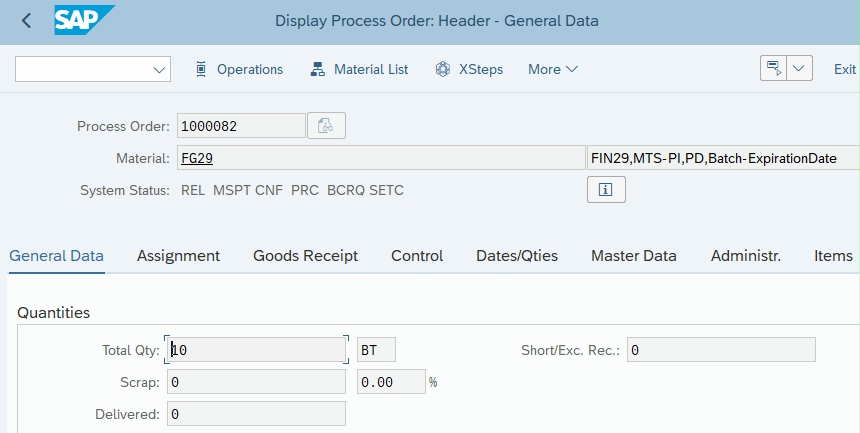
Figure 1 Display Process Order
Process Order Operations and Phases
Click the Operations button at the top to display the Operation Overview, as shown in Figure 2.
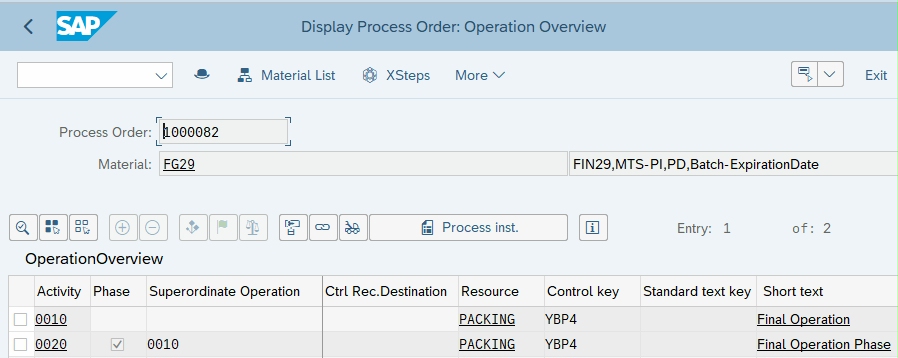
Figure 2 Process Order Operation Overview
A process order contains operations divided into phases. A phase is a self-contained work step that defines part of the production process using the primary resource assigned to the operation.
A resource in process manufacturing is comparable to a work center in discrete manufacturing. The resource is assigned to a cost center, which provides the activity types used to plan and allocate production costs.
In process manufacturing, phases are generally the relevant objects for costing and scheduling. A phase is assigned to a superior operation and contains standard activity values used to determine dates, capacity requirements, and costs.
Materials are assigned to the operations or phases where they are required in the production process. Raw materials and semi-finished materials issued from inventory are posted as consumption to the process order. Select Material List in the process order to display the assigned materials and their Relevancy to Costing Indicator, as shown in Figure 3.
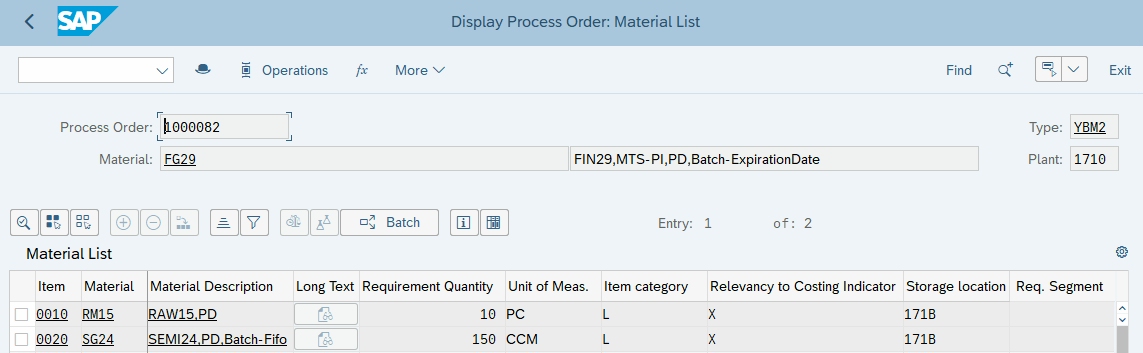
Figure 3 Process Order Material List
Materials in Process Orders
Intra Materials
Intra materials are temporary materials that exist between production phases. They appear in the material list with item category M and are normally not costed. If production is interrupted, an intra material may need to be placed into inventory. In this case, the material is valuated using a material master price selected by the goods-receipt valuation variant.
By-Products in Process Orders
By-products are incidental outputs of a production process. In a process order, a by-product is entered with a negative quantity in the material list of the primary product or process material. Unlike co-products, the Co-Product indicator is not selected for a by-product in the material master or BOM.
Circulating Materials
Circulating materials, such as catalysts, can be both inputs and outputs of the production process. You can specify in the material list whether a circulating material is relevant to costing. SAP determines the material price from the material master. When the material is relevant to costing, it appears in the itemization as both an input and an output. The resulting balance represents the material input cost.
Co-Products
Co-products are additional products produced together during the same production process. In the process order material list, co-products are represented with negative quantities. Both leading and non-leading co-products can be relevant to costing, while the leading co-product represents the primary product.
Process Instructions in SAP Process Orders
Process instructions (PI) provide information required to execute production phases in process manufacturing. You can maintain process instructions for a phase by selecting Operations, selecting the phase, and choosing Operation → Process Instruction Overview.
What the Order Type Means for Product Costing
Both order types collect material consumption, production activities, and applicable overhead. The main master-data difference is the source of the activity quantities: routing operations for production orders and costing-relevant recipe phases for process orders.
Check component quantities, costing relevance, resource or work center assignments, activity quantities, and activity rates before investigating unexpected order costs. In joint production, also review the co-product indicators and cost apportionment structure. Co-products and by-products are not exclusive to process orders.
Conclusion
Production orders and process orders support different manufacturing environments in SAP S/4HANA. Production orders are typically used for discrete manufacturing with BOMs and routings, while process orders support process manufacturing with master recipes, operations, phases, and process instructions.
Process orders also support specialized requirements such as intra materials, by-products, circulating materials, and co-products. Understanding these differences helps you select the appropriate manufacturing order and analyze production costs in SAP S/4HANA.
Need Help with Process Order Costing in SAP S/4HANA?
ERPCorp can help you review manufacturing order costing, phase and activity allocations, co-product cost apportionment, WIP, and variance analysis.
Work with our SAP Product Costing consultants to connect your manufacturing processes with clear cost reporting and period-end closing.
Reference Materials
Glossary
Activity Type
An activity type identifies activities provided by a cost center to manufacturing orders. The secondary cost element associated with an activity type identifies the activity costs on cost center and detailed reports.
Backflushing
Backflushing is the automatic posting of a goods issue for components after their actual physical issue for use in an order. The goods issue posting of backflushed components is carried out automatically during confirmation.
Backflushing reduces the amount of work in warehouse management, especially for low-value parts. The material components from the BOM required in the operation should be assigned to the operations in the routing.
Bill of Material
A bill of material (BOM) is a structured hierarchy of components necessary to build an assembly. BOMs and purchasing info records provide cost estimates with the information necessary to calculate the material costs of assemblies.
By-Product
An incidental output represented by a negative material quantity, without the Co-product indicator. When relevant to costing, its value reduces the cost of the main product or co-products.
Circulating Material
A material, such as a catalyst, introduced and later recovered during production. Costing reflects its net consumption when relevant.
Co-Product
A product manufactured jointly with other products. The Co-product indicator identifies it, and an apportionment structure determines its share of joint production costs.
Confirmation
A confirmation documents the processing status of orders, operations, and individual capacities. You specify the operation yield, scrap and rework quantity, the activity quantity, work center, and who performed the operation.
Cost Center
A cost center is master data that identifies where the cost occurred. A responsible person assigned to the cost center analyzes and explains cost center variances at period end.
Cost Estimate
A calculation of planned procurement or manufacturing costs. A quantity-based estimate values material components and production activities using the configured valuation strategies and adds applicable overhead.
Goods Issue
A goods issue is the movement (removal) of goods or materials from inventory to manufacturing or to a customer. When goods are issued, it reduces the number of stock in the warehouse.
Intra Material
A temporary intermediate material between process phases, normally listed with item category M and excluded from costing.
Master Recipe
Master data describing a process manufacturing sequence through operations, phases, resources, and process instructions.
Material List
The input and output materials assigned to a process order, including their quantities and assignment to operations or phases. The list can include raw materials, intra materials, by-products, and co-products. Each item’s costing relevance determines whether it is included in the cost calculation.
Operation
A manufacturing step performed at a work center or resource. In discrete manufacturing, routings organize the work into operations. In process manufacturing, a master recipe groups detailed phases under operations.
Phase
A detailed process step assigned to an operation. Costing-relevant phases contain the standard activity values used for cost calculation.
Process Instruction
Information associated with a phase that supports execution and process control.
Process Order
A manufacturing order for process industries, usually based on a master recipe and materials list. It contains operations and phases; each phase belongs to a higher-level operation and carries activity values for scheduling and costing.
Production Order
A production order is used for discrete manufacturing. A BOM and routing are copied from master data to the order. A sequence of operations is supplied by the routing, which describes how to carry out work-steps.
An operation can refer to a work center at which it is to be performed. An operation contains planned activities required to carry out the operation. Costs are based on the material components and activity price multiplied by a standard value.
Production Version
A production version determines which alternative BOM is used together with which task list/master recipe to produce a material or create a master production schedule. For one material, you can have several production versions for various validity periods and lot-size ranges.
Resource
A process manufacturing capacity, such as a vessel or production line, used to execute operations and phases.
Routing
A routing is a list of tasks containing standard activity times required to perform operations to build an assembly. Routings, together with planned activity prices, provide cost estimates with the information necessary to calculate labor and activity costs of products.
Work Center
Operations are carried out at work centers representing; for example, machines, production lines, or employees. Work center master data contains a mandatory cost center field. A work center can only be linked to one cost center, while a cost center can be linked to many work centers.
Work in Process
Production costs associated with unfinished manufacturing. Eligible WIP is capitalized in Financial Accounting according to the configured valuation and posting method, then reversed as production is completed.