
By John Jordan

The SAP actual cost component split shows the composition of actual material costs by categories such as material, labor, and overhead. It retains the origin of costs across production levels, helping you explain how lower-level costs contribute to semi-finished and finished products.
It complements Actual Costing with SAP Material Ledger by adding component detail to material cost analysis. This guide covers classic activation and display steps, release-specific startup considerations, and the distinction between costing-based CO-PA and Margin Analysis reporting.
What the Actual Cost Component Split Shows
Multilevel price determination calculates material costs using the flow of materials through production. The actual cost component split adds a breakdown by cost component, so that a material’s total actual cost can be analyzed by its underlying cost categories.
You can compare planned and actual component values and review supported currencies and valuation views. Use a consistent material, period, currency, quantity basis, and component structure when interpreting the comparison.
In SAP S/4HANA, Material Ledger is mandatory while Actual Costing remains optional. Activating Material Ledger alone does not establish a complete Actual Costing process or replace the cost component split setup.
Activate the Actual Cost Component Split
Before activation, review the cost component structure, the relevant valuation areas, Actual Costing settings, and price determination 3 for participating materials. Plan the activation and startup as part of a controlled period transition.
In the classic IMG, follow:
Controlling → Product Cost Controlling → Actual Costing/Material Ledger → Actual Costing → Activate Actual Cost Component Split
The activation settings are illustrated in Figure 1. Maintain the required indicators for the relevant valuation areas and complete the applicable startup procedure.

Figure 1: Activate Actual Cost Component Split
SAP’s classic documentation specifies activation at the beginning of a period and states that the split cannot be created for transactions already posted in that period. Confirm the supported activation and data-conversion procedure for your release before making the change.
Startup: SAP ECC and SAP S/4HANA
The original SAP ECC procedure in this article used report MLCCS_STARTUP, executed through SA38, to initialize cost component split data for the selected plants. Treat this as historical ECC guidance, rather than a universal startup instruction.
For SAP S/4HANA, use the release-specific startup or conversion procedure. SAP’s support guidance identifies different startup programs and relevant corrections; review SAP Note 3147202 and the notes applicable to your system. SAP also documents FCML4H_STARTUP for setting Actual Costing productive retroactively. Actual Costing startup and cost component split startup must be assessed for the specific scenario.
Validate the resulting component totals, beginning inventory, and subsequent postings in a test system. Startup does not mean that a detailed historical split is automatically reconstructed for every earlier transaction.
Display the Actual Cost Component Split
In the classic SAP GUI example, open the material with MM03 and navigate to Accounting 1. The material master menu path is:
Logistics → Materials Management → Material Master → Material → Display → Display Current
Locate the Cost components button shown in Figure 2. The available screens and navigation depend on your SAP release and activated functions.

Figure 2: Cost Components Button in Accounting 1
Choose Cost components to display the split, as illustrated in Figure 3. Check the selected period, currency, and valuation before comparing values.
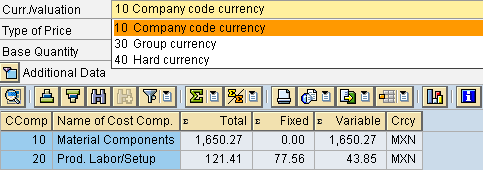
Figure 3: Actual Cost Component Split by Valuation
Plan and Actual Cost Component Example
Table 1 illustrates a comparison for one unit of the same material in the same currency. The amounts are illustrative; the actual reporting layout depends on your configuration.
| Cost Component | Plan | Actual | Difference |
|---|---|---|---|
| Material | 60 | 66 | 6 |
| Labor | 25 | 28 | 3 |
| Overhead | 15 | 16 | 1 |
| Total | 100 | 110 | 10 |
Table 1: Illustrative plan and actual costs per unit
Actual cost exceeds plan by 10 per unit: 6 in material, 3 in labor, and 1 in overhead. The split identifies where the differences sit; determining their causes requires review of the underlying purchasing, production, and allocation data.
Use Cost Components in Profitability Analysis
The value-field mapping described below applies to costing-based Profitability Analysis (CO-PA). Define access to the relevant Actual Costing/Material Ledger data, map cost components to value fields, and complete the applicable valuation or revaluation process. The mapping alone does not populate every profitability report automatically.
Controlling → Profitability Analysis → Master Data → Valuation → Set Up Valuation Using Material Cost Estimate → Define Access to Actual Costing/Material Ledger
Then maintain the component assignment under:
Controlling → Profitability Analysis → Master Data → Valuation → Set Up Valuation Using Material Cost Estimate → Assign Value Fields
In SAP S/4HANA, Margin Analysis uses accounts rather than costing-based CO-PA value fields. Assess its COGS split and actual revaluation design separately. See our SAP COGS Split guide for that reporting context.
Common Configuration Issues
If the split is missing, incomplete, or difficult to reconcile, review these points:
- Missing prerequisites: confirm Actual Costing, cost component split activation, and the participating materials’ price determination settings.
- Wrong startup procedure: distinguish the historical ECC report from the procedure supported by your S/4HANA release.
- Unexpected component assignments: review the cost component structure and the source data used to initialize the split.
- Inconsistent comparisons: align period, currency, valuation, quantity basis, and closing status.
- CO-PA totals missing: check whether the report uses costing-based value fields or Margin Analysis accounts, then verify its valuation process.
For changes to an existing structure, see changing the cost component structure with Material Ledger active.
Conclusion
The actual cost component split adds detail to Actual Costing by retaining cost categories across manufacturing levels. A useful comparison depends on consistent configuration, a supported startup procedure, and the correct reporting integration. Treat costing-based CO-PA and Margin Analysis as distinct designs when deciding how to report the results.
SAP Documentation
- Actual Cost Component Split: classic prerequisites and use
- Material Ledger startup guidance for SAP S/4HANA
- Installation: Actual Costing/Material Ledger
- Costing-Based Profitability Analysis and Margin Analysis
Need Help with Actual Costing and Cost Component Splits?
ERPCorp helps you review Material Ledger configuration, cost component structures, period-end results, and profitability reporting in SAP ECC and S/4HANA.
Glossary
Actual Cost Component Split
The breakdown of actual material costs into components, preserving their cost origin across manufacturing levels.
Actual Costing
An optional Material Ledger process that calculates periodic actual material prices and allocates eligible differences. Revaluation depends on closing settings and options.
Cost Component
A category of costs, such as material, labor, or overhead, used to explain the composition of a material’s cost.
Cost Component Structure
The configuration that defines cost components and assigns cost elements and other relevant criteria to those components.
Costing-Based CO-PA
Profitability Analysis that groups revenue and costs into configured value fields and supports costing-based valuation.
Margin Analysis
Account-based profitability reporting in SAP S/4HANA that uses journal entries and market segment characteristics.
Material Ledger
SAP inventory accounting functionality supporting multiple currencies and valuations and providing the basis for optional Actual Costing.
Multilevel Price Determination
The Actual Costing process that allocates eligible differences through the material consumption structure to higher production levels.
Price Determination 3
The material setting for single-level and multilevel price determination used by materials participating in Actual Costing.
Valuation Area
The organizational level at which material inventory is valuated, commonly a plant.
Value Field
A configured amount or quantity field used to store and report values in costing-based CO-PA.