
By John Jordan

What Is Purchase Price Variance in SAP?
Purchase Price Variance (PPV) in SAP S/4HANA occurs when the actual procurement cost of a material differs from the price used to value the material. For materials using Standard Price (S), differences between the standard price and goods receipt or invoice receipt values can be posted to price difference accounts. A purchase order alone normally does not create an FI price-difference posting.
Analyzing PPV helps Purchasing identify the causes of procurement cost variances, including changes in supplier prices, purchase order prices, freight costs, exchange rates, and invoice prices. Assigning PPV to Purchasing also provides greater visibility into the materials and transactions driving those differences.
Table of Contents
- Purchase Price Variance Example
- Assign PPV to Purchasing with OKB9
- Analyze PPV by Cost Center
- Analyze PPV Line Items
- Material Price Variance App
- Common Configuration Issues
- Conclusion
- Glossary
Purchase Price Variance Example: Standard Price
Assume a stock material has a standard price of $10 per unit. You order and receive 100 units at $12 each, then receive an invoice for $1,250. With goods receipt before invoice receipt, no tax, freight, exchange-rate effects, or quantity differences, Table 1 shows the simplified postings.
| Posting | Debit | Credit |
|---|---|---|
| Goods receipt | Inventory $1,000; price difference $200 | GR/IR $1,200 |
| Invoice receipt | GR/IR $1,200; price difference $50 | Supplier $1,250 |
Table 1: Purchase Price Variance Postings for a Standard-Price Material
The total unfavorable procurement price difference is $250 = ($12.50 − $10.00) × 100 units. The $200 goods-receipt difference and $50 invoice difference explain the total. Inventory remains valued at standard price at these postings; any subsequent Actual Costing allocation is a separate period-end process.
You can use transaction OKB9 (Maintain Automatic Account Assignment) to assign a default cost center to the G/L account used for purchase price differences. This allows PPV postings to be captured on a designated Purchasing cost center for analysis.
Scope: The OKB9 and OBYC transaction walkthrough applies to SAP ECC and SAP S/4HANA on-premise and Private Edition where these transactions are available. Public Edition uses the supported configuration activities and apps for the relevant scope.
Assign Purchase Price Variance to Purchasing with OKB9
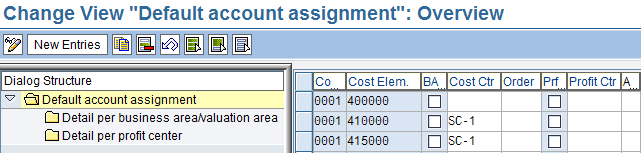
Figure 1: Automatic Account Assignment (OKB9)
In transaction OKB9, you maintain the default CO account assignment for the relevant PPV G/L account. To direct purchase price differences to Purchasing, assign the appropriate Purchasing cost center to the G/L account used for those differences. Where required, you can maintain different default account assignments by organizational criteria such as valuation area.
OBYC automatic account determination determines the G/L account for the price difference; OKB9 supplies a default CO account assignment where applicable. Check existing account assignments and derivation rules before assuming that every posting will use the Purchasing cost center. The PPV account must be configured for cost accounting with an appropriate cost element category.
Analyze Purchase Price Variance by Cost Center
You can analyze PPV assigned to the Purchasing cost center using Cost Center Accounting reports. The classic Cost Centers: Actual/Plan/Variance report provides actual and planned costs and their variances by G/L account. In current SAP S/4HANA releases, additional Fiori-based cost center reporting and analysis options are also available.
Figure 2 shows an example of PPV analysis using the classic cost center report.
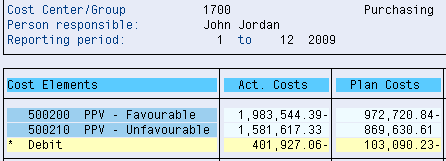
Figure 2: PPV Analysis by Purchasing Cost Center
Analyze PPV Line Items in SAP S/4HANA
For materials using Standard Price, purchase price differences are posted to price difference accounts determined through automatic account determination. You can analyze these postings at the G/L account and cost center level and drill down to the individual transactions that generated the variance. Figure 3 shows an example of PPV line-item analysis using a classic SAP report.

Figure 3: PPV Line-Item Analysis
Line-item analysis allows you to identify the materials and transactions responsible for the largest purchase price differences and investigate the underlying causes of the variance.
Analyze PPV with the Material Price Variance App
Current SAP S/4HANA releases also provide the Material Price Variance app for Purchasing analysis. The app helps analyze material price variances across purchasing info records, purchase orders, contracts, and invoices. Results can be filtered and analyzed by dimensions including plant, supplier, purchasing group, and purchasing organization.
The Material Price Variance app analyzes price deviations between purchasing documents. Its results should not be assumed to equal the PPV balance posted to G/L accounts. App availability and features depend on your SAP S/4HANA release and deployment.
Common Configuration Issues
If PPV is missing or assigned unexpectedly, check the posting and its configuration in this order:
- Price control: Confirm whether the material uses Standard Price (S) or Moving Average Price (V). Their treatment of price differences differs.
- G/L account: Check the PRD account selected through OBYC for the actual valuation and posting context.
- CO relevance: Confirm that the price difference account supports the intended cost-accounting assignment.
- Default assignment: Check the OKB9 entry and any existing account assignment or derivation that affects the result.
- Responsibility: Separate supplier-price changes from exchange-rate and other effects before evaluating Purchasing performance.
- Reconciliation: Reconcile the accounting documents to the cost center report. Purchasing-document price comparisons can use a different baseline.
Conclusion
Purchase Price Variance analysis helps Purchasing identify why actual procurement costs differ from expected or standard costs. In SAP S/4HANA, PPV can be analyzed through G/L and cost center reporting as well as purchasing analytics such as the Material Price Variance app. Material Ledger and Actual Costing provide additional capabilities for analyzing material price differences and actual inventory costs.
Assigning responsibility for PPV helps Purchasing identify changes in supplier prices, purchase order prices, invoice prices, and other procurement costs.
Improve SAP Purchase Price Variance Analysis
Need help tracing procurement price differences or assigning PPV to the right area of responsibility? ERPCorp helps your Finance and Purchasing teams review OBYC and OKB9 configuration, reconcile PPV postings, and improve cost reporting.
Work with SAP specialists in Product Costing, Material Ledger, Actual Costing, and S/4HANA Finance & Controlling.
Glossary
Actual Costing
An optional Material Ledger function that calculates periodic unit prices using actual costs and allocates eligible price differences to inventory and consumption according to the costing settings and quantity flows.
Automatic Account Assignment (OKB9)
A function for maintaining default CO account assignments for cost-relevant G/L accounts, with organizational differentiation where configured. Existing assignments and derivation rules can affect which assignment is used.
Automatic Account Determination (OBYC)
Configuration that determines the G/L accounts used for inventory-related postings, including price differences, using transaction keys and other account determination criteria.
Cost Center
A Controlling master data object used to collect costs for an area of responsibility. A Purchasing cost center can collect qualifying PPV postings when the appropriate account assignment is supplied.
Goods Receipt
A posting that records receipt of materials from a supplier or production. For a valuated receipt into stock, it updates inventory quantity and value.
GR/IR Clearing Account
The account used to offset goods receipt and invoice receipt postings. Differences in receipt and invoice quantities can leave balances requiring investigation.
Invoice Receipt
The posting of a supplier invoice. Differences from the goods receipt valuation are handled according to price control and other accounting settings.
Material Ledger
The material valuation functionality required in SAP S/4HANA. It supports multiple currencies and provides the basis for optional Actual Costing.
Moving Average Price (V)
A price control under which valuation-relevant receipts and invoice differences can update inventory value and the material price. Insufficient stock coverage can cause differences to be posted to price difference accounts.
Price Difference Account (PRD)
A G/L account determined through the PRD transaction key in automatic account determination. Procurement and other valuation differences may post to this account depending on the process and configuration.
Purchase Price Variance (PPV)
A difference between actual procurement costs and the valuation or comparison price. For materials with Standard Price, procurement price differences are recorded separately from inventory valuation.
Standard Price (S)
A price control that values inventory at a fixed price. Differences between the standard valuation and actual procurement costs are posted separately to price difference accounts.