
By Kent Bettisworth and Gerald Steele

SAP Internal Orders and Work Breakdown Structure (WBS) elements are both used to plan, collect, monitor, and control costs in SAP S/4HANA. However, they serve different purposes. Internal Orders are generally suited to simpler, short-term cost tracking, while WBS elements in SAP Project System support more complex projects with hierarchical structures, schedules, budgets, and detailed project reporting.
Understanding the differences is essential in optimizing projects. This blog compares Internal Orders and Project System WBS by exploring their definitions, benefits, features, and implementation tips.
Edition note: This comparison describes classic Internal Orders and Project System in SAP ECC and SAP S/4HANA on-premise or Cloud Private Edition. For SAP S/4HANA Cloud Public Edition, use the applicable project functionality rather than assuming classic Internal Orders and PS transactions are available. See SAP documentation on projects in Public Edition.
Table of Contents
Introduction
Internal Orders provide a relatively simple way to collect and monitor costs for specific activities, initiatives, or short-term projects. WBS elements, part of SAP Project System (PS), provide a hierarchical structure for planning and controlling more complex projects involving multiple phases, activities, budgets, and responsibilities.
Definitions
An Internal Order is a Controlling (CO) cost object used to plan, collect, monitor, and settle costs for a specific activity or purpose. Internal Orders are commonly used for short-term initiatives, events, maintenance activities, marketing programs, and other costs that need to be tracked separately.
A Work Breakdown Structure (WBS) organizes a project into hierarchical elements representing phases, deliverables, tasks, or other project components. In SAP Project System (PS), WBS elements can be used to plan, budget, collect, and report costs at different levels of the project structure.
Benefits
Internal Orders provide a straightforward way to monitor costs for specific activities without creating a full project structure. They support planning, budgeting, actual cost tracking, variance analysis, and settlement, giving managers visibility into the financial performance of individual initiatives.
For a step-by-step budgeting example, see: SAP Internal Order Budgeting and Availability Control.
WBS elements provide structured control for complex projects by organizing costs, revenues, budgets, and responsibilities within a hierarchy. They support detailed planning and reporting across project phases and make it easier to analyze financial performance at individual WBS levels or across the entire project.
Comparison
| Requirement | Internal Order | WBS / Project System |
|---|---|---|
| Structure | A single cost object for an activity or initiative; order groups support collective reporting. | A hierarchy of project elements for phases, deliverables, and responsibilities. |
| Cost control | Plan, budget, and monitor costs, commitments, and variances by order. | Plan and monitor costs and budgets across project levels. Actual costs and commitments require the account assignment indicator; revenue postings require a billing element. |
| Scheduling and resources | Primarily financial tracking; an Internal Order alone does not provide network scheduling. | WBS elements organize scope and dates; networks and activities support detailed scheduling and resource requirements. |
| Reporting | Analyze individual orders or groups of orders. | Analyze individual WBS elements and totals across the project hierarchy. |
| Settlement | Settle real order costs to permitted receivers according to the settlement rule. | Settle project costs to permitted receivers according to project settings and settlement rules. |
For WBS elements, the operative indicators determine whether an element supports cost planning, account assignment, or billing. See SAP documentation on WBS operative indicators.
The Project Planning Tool Decision Matrix provides another view of the choice, based on project complexity, planning, scheduling, and integration requirements.
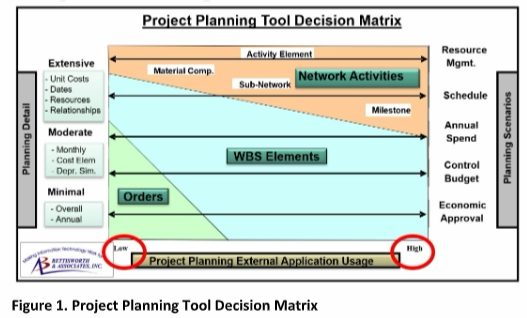
Figure 1: Project Planning Tool Decision Matrix
Integration with Other Modules
Internal Order: It integrates with several modules, including Controlling (CO), Financial Accounting (FI), Purchasing (MM), and Investment Management (IM). This enables an integrated view of project costs, budget allocations, commitments, and financial performance.
WBS: Integrates with SAP Controlling (CO), Financial Accounting (FI), Materials Management (MM), Sales, Procurement, Asset Accounting, Plant Maintenance, and other SAP processes. This integration allows project costs, revenues, commitments, assets, and operational activities to be managed within a common project structure.
Practical Tips and Tricks
Choosing between Internal Orders and WBS elements depends on the complexity, duration, reporting, and planning requirements of your project. Consider these practical guidelines:
1. Clearly define project scope and objectives before deciding which project type to use: Internal Orders or WBS. This clarity will help structure projects appropriately and select the most suitable approach and tool.
2. Involve key stakeholders, including team members, sponsors, and clients, in the design and implementation process to ensure alignment with organizational goals. Their input and feedback will help select the most appropriate project management approach and SAP project concept and secure buy-in from all parties involved.
3. Regularly monitor and update the chosen project tool, either Internal Orders or WBS, to reflect changes in project requirements. Continuously review and update each as the project progresses. This will help you identify and mitigate potential risks and ensure the project remains on track.
4. Train project team members to use the Internal Order and WBS tools to maximize the benefits.
5. Leverage available SAP resources, such as user manuals, company experts, and online forums, to enhance your understanding and proficiency in using these tools.
6. Reporting and Analytics: Understand and utilize the available reporting and analytics capabilities of Internal Orders or Project System WBS to gain insights into project performance, budget capacity, resource utilization, and cost control. This data-driven approach will enable informed decision-making and initiative-driven project management.
Summary
Internal Orders and WBS elements both provide powerful ways to plan, monitor, and control project-related costs in SAP S/4HANA. Internal Orders are generally better suited to simpler, short-term activities requiring focused cost tracking, while WBS elements provide the hierarchical structure, planning capabilities, and reporting needed for more complex projects.
Choosing between them depends on the project's complexity, duration, budgeting, scheduling, integration, and reporting requirements.
Choosing Between Internal Orders and WBS Elements?
Build a cost tracking structure that fits your project scope, budget controls, and reporting needs.
ERPCorp helps teams review Internal Orders, Project System integration, budgeting, and settlement in SAP Finance and Controlling.
Network with our expert speakers and attendees at our annual SAP Controlling Financials conference in San Diego.
Glossary
Accrual Order
An Accrual Order is an Internal Order used to collect and monitor period-related accruals in SAP Controlling.
Cost Center
A Cost Center is an organizational unit used to collect and monitor costs for a defined area of responsibility. Unlike an Internal Order or WBS element, a cost center typically represents an ongoing organizational function.
Fixed Assets
Fixed Assets are long-term tangible assets, such as buildings, machinery, and equipment. Investment-related costs collected on Internal Orders or WBS elements may subsequently be capitalized and settled to fixed assets.
Internal Order
An Internal Order is a Controlling (CO) cost object used to plan, collect, monitor, and settle costs for specific activities or purposes. Internal Orders are often used when the scope does not require the more detailed project structure available with WBS elements.
Order Type
Order Type controls key settings for Internal Orders, including number assignment, status management, planning parameters, and settlement behavior.
Periodic Reposting
Periodic Reposting is used in SAP Controlling to periodically reallocate collected costs from one cost object to other cost objects based on defined rules or statistical key figures.
SAP Fiori
SAP Fiori provides role-based applications for accessing and managing SAP S/4HANA processes. Depending on system configuration and available apps, users can perform Controlling and Project System activities and analyze financial information through the SAP Fiori launchpad.
SAP Universal Journal
SAP Universal Journal provides a single source of financial and management accounting data in SAP S/4HANA. Actual postings are stored in ACDOCA, enabling integrated reporting across Financial Accounting, Controlling, and related processes.
Settlement
Settlement transfers costs collected on an Internal Order or WBS element to one or more receiver objects according to defined settlement rules.
Settlement Profile
Settlement Profile defines the rules and parameters that control settlement, including permitted receiver types and settlement options.
Settlement Rule
Settlement Rule defines how costs collected on an Internal Order or WBS element are distributed to one or more receiver objects during settlement.
Source Cost Element
Source Cost Element identifies the original cost element from which costs are allocated or settled in SAP Controlling, helping retain information about the nature of the original costs.
Statistical Key Figure
Statistical Key Figure is a measurable value, such as number of employees, square footage, or machine hours, that can be used as a basis for allocating costs in SAP Controlling.
Statistical Order
A Statistical Order is an Internal Order used for additional reporting and analysis while the actual cost is posted to another real cost object, such as a cost center. Statistical Orders do not receive real costs and are not subsequently settled.
Tracing Factor
Tracing Factor defines how costs are distributed among receiver objects during periodic allocations in SAP Controlling. Examples include statistical key figures, percentages, fixed amounts, or other allocation bases.
Variance Analysis
Variance Analysis compares planned or budgeted costs with actual costs to identify and analyze differences. Internal Orders and WBS elements can both be used to monitor costs and analyze variances during an activity or project.
WBS Element
A WBS Element is a structural component of a Work Breakdown Structure in SAP Project System used to organize, plan, collect, and monitor costs and other project information. WBS elements are useful when activities require a more detailed hierarchical project structure than an Internal Order provides.