
By John Jordan

Introduction
In SAP S/4HANA, automatic account determination controls which General Ledger (G/L) accounts are posted when inventory movements occur in Materials Management (MM). Correct account determination is essential for accurate inventory valuation, production cost reporting, and integration between Materials Management and Financial Accounting (FI).
A common question is how to identify the G/L account that SAP automatically selects for a particular goods movement. For example, when raw materials are issued to a production order, SAP uses account determination settings to identify the inventory account and the corresponding consumption account.
In SAP ECC and SAP S/4HANA on-premise and Private Edition, OBYC provides the configuration for MM automatic account determination, and T030 stores the relevant G/L account assignments. With the required display authorization, SE16N lets you review these entries without changing them.
This guide walks through a T030 lookup for GBB/VBR, explains how to read the results, and checks them against a goods issue to a production order. For the broader configuration logic and movement-type posting examples, see our SAP MM-FI account determination guide.
Display SAP OBYC Account Determination with T030 and SE16N
Scope and access: This SAP GUI walkthrough applies where SE16N and table-display access are available, including SAP ECC and SAP S/4HANA on-premise and Private Edition. SE16N requires its own authorization; access to it does not follow automatically from being unable to change OBYC. In SAP S/4HANA Cloud Public Edition, use the account-determination configuration activities and supported apps available for your role and scope.
1. Prepare the Lookup
Identify the company code’s chart of accounts, the relevant plant/valuation area and valuation grouping code, and the material’s valuation class. Check the actual movement type and posting context before choosing the transaction key and modifier.
2. Open T030 in SE16N
Start transaction SE16N, enter table T030, and press Enter to display the selection screen shown in Figure 1.

Figure 1: SAP T030 Selection Screen for OBYC Automatic Account Determination
3. Filter the GBB/VBR Account Assignments
The following values illustrate a consumption-account lookup for a 261 goods issue. Replace them with your system’s settings. The transaction-key rules determine which dimensions are relevant.
| Selection | Example | What to Check |
|---|---|---|
| Chart of Accounts | INT | Use the operating chart of accounts assigned to the company code. |
| Transaction Key | GBB | Select the offsetting entry for inventory posting. |
| Valuation Grouping Code | 0001 | Use the grouping code assigned to the relevant valuation area. |
| Account Modifier | VBR | Commonly used for an internal goods issue to an order. |
| Valuation Class | 3000 | Use the material’s actual valuation class; 3000 is illustrative. |
For a single material, filter on its valuation class. To compare account assignments across classes, leave the valuation-class selection open while retaining the other relevant filters.
4. Execute the Selection
Choose Execute (F8) to display the matching account assignments shown in Figure 2.
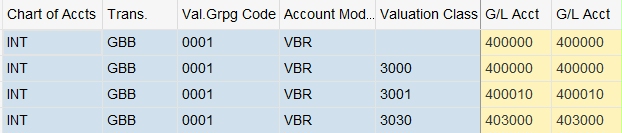
Figure 2: SAP T030 Entries for GBB/VBR Automatic Account Determination
The T030 entries show configured G/L account assignments for the selected GBB/VBR combination and valuation classes. The matching row helps explain the consumption account selected for the material.
Read and Verify the T030 Results
- Match the full selection. Check the chart of accounts, transaction key, valuation grouping, modifier, and valuation class used by the posting.
- Read the G/L account assignments. Review the applicable debit/credit account fields and the transaction-key rules. A row for another valuation class is not evidence that your material uses that account.
- Check both sides of the goods issue. GBB/VBR identifies the consumption account in this example. Run a separate lookup for BSX to review the inventory account, using the dimensions relevant to BSX.
- Compare with the accounting document. Display a representative posted goods issue and confirm the inventory credit, consumption debit, and production-order assignment.
Configuration versus postings: T030 shows the configured assignments in the current system and client. It is not a list of posted journal entries. To confirm what was actually posted, use the material and accounting documents; current settings alone do not prove the configuration that existed at an earlier posting date.
Example: Goods Issue to a Production Order
Consider a manufacturing company that issues raw materials to a production order using movement type 261.
Assume the following example:
- Material: Raw Material A
- Quantity issued: 100 units
- Inventory valuation price: $25 per unit
- Total goods issue value: $2,500
- Valuation class: 3000
- Transaction key: GBB
- Account modifier: VBR
When the goods issue is posted, SAP reduces raw material inventory and records the material consumption against the production order.
Example Accounting Entry
| G/L Account | Debit | Credit |
|---|---|---|
| Raw Material Consumption | $2,500 | — |
| Raw Material Inventory | — | $2,500 |
| Total | $2,500 | $2,500 |
In this example, transaction key BSX determines the inventory G/L account, while GBB with account modifier VBR determines the consumption G/L account.
SAP uses the relevant valuation area, valuation grouping code, chart of accounts, and material valuation class to identify the configured G/L accounts.
You can use transaction SE16N to display table T030 and verify which G/L account is assigned to the GBB/VBR combination for the applicable valuation class.
This example illustrates how SAP MM-FI automatic account determination supports consistent financial postings without requiring users to enter the G/L accounts manually for each goods movement.
Note: The values and G/L account descriptions are illustrative. Actual account assignments depend on your organization's SAP configuration.
Configuration Path and SAP Documentation
In SAP ECC and SAP S/4HANA on-premise and Private Edition, the classic IMG path for MM automatic postings is:
Materials Management › Valuation and Account Assignment › Account Determination › Account Determination Without Wizard › Configure Automatic Postings
Figure 3 displays the menu path.
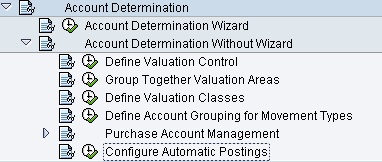
Figure 3: Configure Automatic Postings Menu Path
Use the documentation icon beside Configure Automatic Postings to review the IMG activity documentation. For official online reference, see SAP Help on material valuation and account assignments and GBB account modifiers. For Public Edition, see account-determination configuration and select the documentation for your release and scope.
OBYC, T030, SE16N, and OKB9 Compared
| Object / Transaction | Purpose |
|---|---|
| OBYC | Review or maintain MM automatic account determination in the classic configuration environment. |
| T030 | Stores the relevant configured G/L account assignments; it does not store the goods-movement postings. |
| SE16N | Displays table entries such as T030 when your role has the required access. |
| OKB9 | Maintains default CO account assignments where applicable; it does not replace the OBYC account-selection rules. |
First identify the G/L account through account determination, then check the receiving order, cost center, or other CO assignment. For an example of default cost assignment, see assigning purchase price variance to Purchasing with OKB9.
Troubleshoot Missing or Unexpected Entries
- No matching row: Confirm the system/client, chart of accounts, valuation grouping code, modifier, and material valuation class. Check whether the transaction-key rules use each selection field.
- Unexpected account: Compare the actual material and valuation type with the selection. Review the movement’s business context instead of assuming that every goods issue uses GBB/VBR.
- Blank grouping or modifier: A blank value can be valid when a dimension is not used by the account-determination rule. Check the rules before treating it as missing configuration.
- Table access unavailable: Ask the authorized configuration team for the relevant account assignments or use the supported configuration display for your deployment.
- Account is correct, cost assignment is wrong: Review the order/cost-center derivation and applicable defaults separately from the G/L account lookup.
For the wider configuration checklist and posting examples, return to SAP MM-FI account determination with OBYC.
Find the Reason Behind Your SAP G/L Postings
Need help tracing an inventory or consumption account? ERPCorp can help review your OBYC assignments, material valuation, and CO account assignments so your team can explain the posting from source transaction to G/L account.
Glossary
Account Modifier
An account modifier, also called an account grouping code, differentiates the account assignment within certain transaction keys. In the goods-issue example, VBR refines transaction key GBB to select the consumption account.
Chart of Accounts
The operating chart of accounts assigned to the company code is part of the context for selecting the appropriate automatic G/L account assignments.
Goods Issue
A goods issue records the removal of material from inventory for consumption, production, or delivery. For a valuated issue to a production order, SAP typically credits inventory and debits consumption with the order as the cost assignment.
Goods Receipt
A goods receipt records the receipt of material from a supplier or in-house production. Its quantity, valuation, and accounting effects depend on the stock type, account assignment, and transaction; not every receipt increases warehouse inventory.
Material Master
A material master contains all of the information required to manage a material. Information is stored in views, and each view corresponds to a department or area of business responsibility. Views conveniently group information together for users in different departments, for example, sales and purchasing.
OBYC
OBYC is the classic SAP configuration transaction for MM automatic account determination in ECC and SAP S/4HANA on-premise and Private Edition.
Price Control
Price control determines whether a material is valued using standard price (S) or moving average price (V). Review it in the material’s valuation data when explaining inventory values and price differences.
Production Order
A production order controls discrete manufacturing and collects costs for the material being produced. It uses material components, operations, and resource information derived from the relevant master data or maintained in the order.
Purchase Price Variance
Purchase price variance is a difference between procurement cost and the price used to value a material. For standard-price materials, differences at goods receipt or invoice receipt can generate separate price-difference postings.
SAP Fiori
SAP Fiori provides role-based applications for SAP S/4HANA. Available account-determination apps and configuration activities depend on deployment, release, scope, and user authorization.
SE16N
SE16N is a general table-display transaction in the SAP GUI environment. With the required authorization, it can display T030 account assignments for analysis.
Standard Price
Standard price is the valuation price for a material with price control S. Eligible released standard cost estimates can update it. Differences between the standard price and procurement or production values can lead to price-difference postings, depending on the transaction and configuration.
T030
T030 stores relevant automatic G/L account assignments used in MM account determination. It contains configuration entries, rather than the individual accounting documents posted by goods movements.
Transaction Key
A transaction key identifies a category of accounting posting. BSX is used for inventory postings, while GBB identifies offsetting entries to inventory postings. The applicable rules define the dimensions used for account selection.
Valuation Area
A valuation area defines the organizational context in which material inventory is valued. Use the area relevant to the posting when checking material valuation data and the assigned valuation grouping code.
Valuation Class
The valuation class groups materials for automatic account determination and helps determine which G/L accounts are posted during inventory transactions. It is used with transaction keys such as GBB in SAP automatic account determination.
Valuation Grouping Code
The valuation grouping code groups valuation areas for automatic account determination, allowing multiple plants to use the same G/L account assignments. It is configured using Transaction OMWD and used in OBYC account determination.