
 SAP Central Finance (CFIN) brings financial postings from multiple SAP and non-SAP source systems into an SAP S/4HANA hub. It supports consolidated financial reporting and a phased approach to selected central finance processes while source ERP systems continue to operate. Reliable results depend on consistent master data and well-governed mappings.
This practical guide explains how to prepare master data, distinguish mapping types, plan the initial load, and control changes after go-live. It is based on Anand Seetharaju’s presentation, “Effective Strategies for Master Data Management in Central Finance,” at the SAP Controlling Conference.
Start With the Target Master Data Model
A Central Finance implementation combines a target S/4HANA system, integration capabilities, and a business design for harmonized finance. Agree on the reporting and process outcomes before deciding how source identifiers will map to the target.
Define the target chart of accounts, organizational structure, cost and profit centers, business partners, and any other master data required by the postings in scope. Assign an owner to each object and document which source record supplies each critical attribute. Create the required target master data before the related FI or CO documents are reposted.
Understand Key, Value & Cost Object Mapping
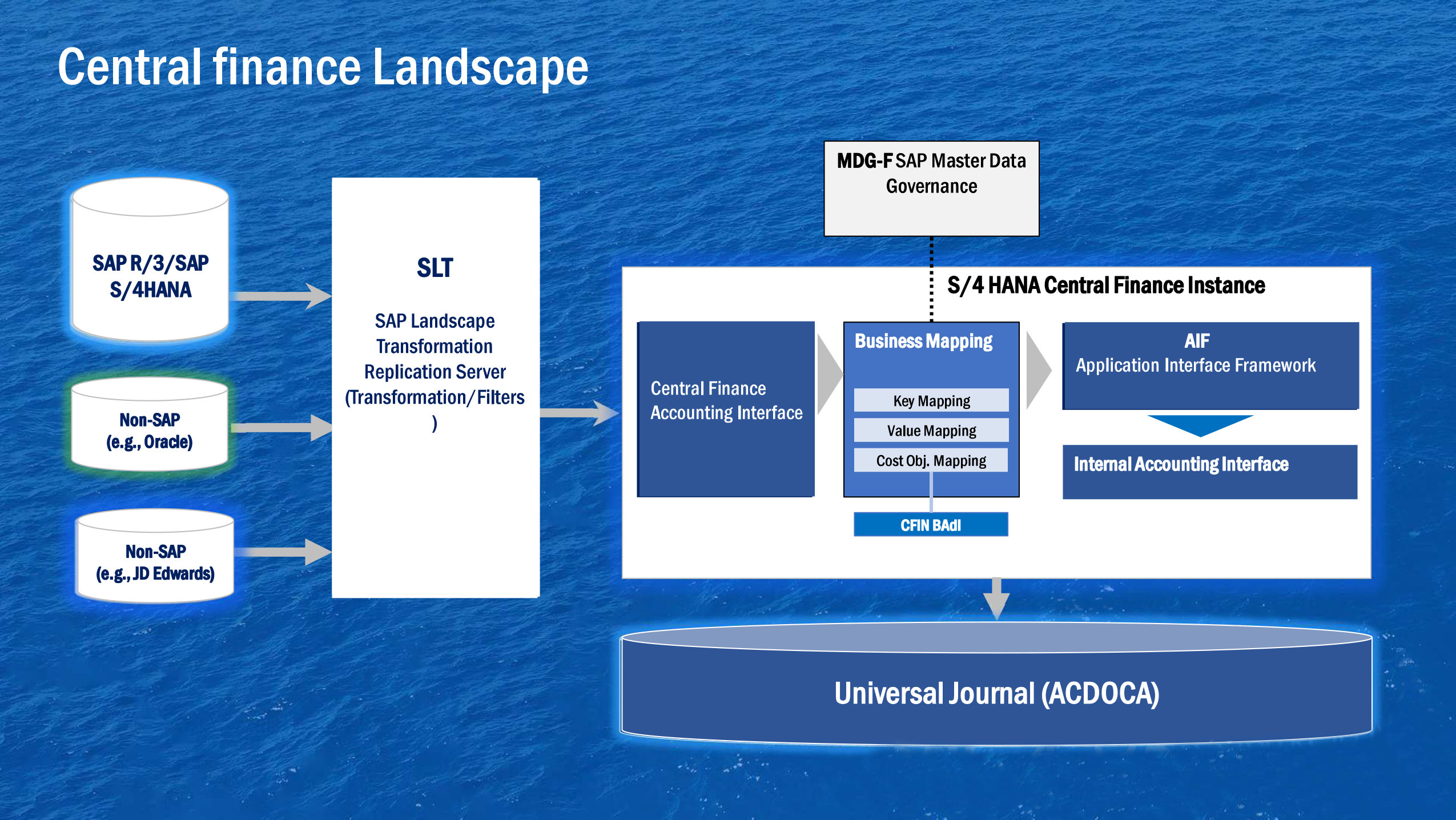
SAP Landscape Transformation Replication Server (SLT) commonly supports financial data replication to Central Finance. Non-SAP sources require an appropriate integration design; the landscape diagram is a conceptual view rather than a complete connection specification.
Central Finance translates source identifiers into target identifiers using different mapping mechanisms:
| Mapping Type | Purpose | Typical Examples |
|---|---|---|
| Key Mapping | Relates identifiers for business objects across systems. | Customer, supplier, material, G/L account, cost center, profit center. |
| Value Mapping | Translates configuration codes or other defined values. | Company code, business area, country code. |
| Cost Object Mapping | Uses configured scenarios to map supported cost objects. | Internal orders and production orders. |
Table 1: Central Finance mapping mechanisms. The applicable entity, context, and scenario determine the detailed configuration.
Central Finance uses SAP Master Data Governance (MDG) mapping functions. Using these functions does not by itself mean that a full MDG governance workflow has been implemented. Mapping also does not create all required target master records: plan a separate, supported creation or distribution process.
Choose mapping actions per entity and test both mapped and unmapped cases. Identical source and target numbers alone do not establish that the objects have the same business meaning. Depending on the release and scope, mapping maintenance includes the Central Finance mapping tools, such as FINS_CFIN_MAP_MANAGE.
Prepare for the Initial Load
The initial load establishes the agreed historical starting point. It can involve balances, open items, documents, and relevant cost objects. A simple “balances, open items, then replication” sequence does not describe every supported scenario.
- Confirm the scope and method. Agree on source systems, company codes, historical periods, reporting requirements, and the supported initial-load approach for your release. Classic initial load and Intermediate Data Retention (IDR) have different preparation and processing requirements.
- Prepare target data and mappings. Validate organizational settings, master records, mapping actions, and cost object scenarios before dependent postings are processed.
- Plan the cutover boundary. Define extraction dates, posting restrictions, replication or recording start points, and responsibility for closing any gaps. With IDR, recording may begin well before target configuration is complete.
- Rehearse and reconcile. Test representative company codes and difficult cases. Compare balances, open items, and document results with the source; investigate differences before accepting the load.
- Approve the transition. Use agreed reconciliation criteria, an error backlog review, and business sign-off before moving to the next cutover stage.
Choose the historical window from reporting, audit, and process requirements. Reducing unnecessary history can lower effort, but “current year only” is not a universal rule.
Harmonize Accounts & Business Partners
- G/L accounts and cost elements: Check account purpose, account type, cost element category, reconciliation-account settings, and open-item management. In S/4HANA, cost elements are represented by G/L accounts. Review historical source changes that may affect the periods being loaded.
- Open-item-managed accounts: Validate the requirements of the selected load and clearing scenario. SAP requires a source open-item-managed G/L account to map to an open-item-managed target account for initial load when Clearing Transfer is used or planned.
- Business partners: Establish a golden record for each customer or supplier. Review duplicates, number ranges, roles, reconciliation accounts, payment terms, payment methods, trading partners, and head-office/branch relationships.
- Cost and profit centers: Define target structures, validity periods, and hierarchies that support the intended management reports. Test the effect of many-to-one mappings on reporting detail.
- Field status: Compare source field availability with target posting requirements. Resolve missing mandatory information through an approved design rather than making fields optional simply to bypass errors.
Improve Source Data Quality
Profile duplicates, missing attributes, blocked records, and inconsistent account assignments before loading. Reduce outstanding open items through valid business clearing where appropriate, including customer, supplier, and clearing accounts. Preserve required accounting detail and reconciliation evidence.
For interface errors, identify whether the cause is missing master data, an invalid mapping, or configuration. The SAP Application Interface Framework (AIF) supports monitoring and error handling for Central Finance interfaces. Correct the underlying issue before restarting affected messages, and use the technical monitor appropriate to the initial-load method.
Govern Master Data & Mapping Changes
Assign business owners, approval steps, transport or maintenance procedures, and an audit trail for master data and mappings. Include role design and the relevant SAP Fiori apps in the operating model.
Mapping changes after go-live require particular care. For example, changing a business partner mapping can cause an invoice and its later clearing to reach different target partners. Changing a company code mapping partway through a year can split related postings across target company codes. Assess previously replicated data, clearing, reconciliation, and downstream processes before approving a change.
Track recurring errors by root cause and owner. Test changes with representative documents, verify the results in the target, and reconcile the affected scope after deployment.
Conclusion
Successful Central Finance master data management starts with the target reporting model and continues through mapping, initial load, reconciliation, and ongoing change control. Treat master records and mappings as governed business assets so the S/4HANA hub produces dependable financial information.
Need Help With SAP Central Finance?
ERPCorp can help you assess master data readiness, review mapping design, and plan reconciliation and governance for your Central Finance implementation.
This article is based on Anand Seetharaju’s SAP Controlling Conference presentation. Explore ERPCorp Membership for access to conference recordings and in-depth SAP finance and controlling education.
SAP References
- Central Finance Prerequisites — target master data, account mapping, and initial-load requirements.
- Introduction to Data Mapping — mapping mechanisms and the effects of later changes.
- MDG Data Mapping — mapping configuration and maintenance.
- Initial Load With Intermediate Data Retention — the IDR approach and preparation.
- Using AIF in Central Finance — monitoring and error handling.
Check the documentation for your SAP release and deployment before applying configuration steps.
Glossary
Application Interface Framework (AIF)
SAP framework used to monitor and handle messages and errors in supported Central Finance interfaces.
Business Partner
The S/4HANA master data object used to represent parties such as customers and suppliers, with the relevant roles and organizational data.
Central Finance (CFIN)
An SAP S/4HANA solution for replicating and harmonizing financial data from multiple source systems for reporting and selected central processes.
Cost Object Mapping
Central Finance configuration that determines how supported source cost objects, such as internal or production orders, relate to target objects.
Golden Record
The agreed authoritative master record and attributes representing a business entity when source systems contain duplicate or conflicting records.
Initial Load
The controlled transfer of the agreed opening and historical data to establish the Central Finance starting position. Scope and processing depend on the selected method.
Key Mapping
A relationship between identifiers for business objects in different systems, interpreted in the relevant mapping context.
Master Data Governance (MDG)
SAP capabilities for master data management and governance. Central Finance uses MDG mapping functions; a complete governance implementation is a separate design decision.
Open Item
An accounting line item that remains outstanding until it is cleared against related items. Open-item management supports matching and reconciliation.
SAP Landscape Transformation Replication Server (SLT)
SAP technology commonly used to transfer source financial data into the Central Finance integration flow.
Value Mapping
A relationship that translates configuration codes or other defined values from a source system into corresponding target values.